
Restaurant POS

Free restaurant POS system for the counter and the bar

A free register for quick service, cafés, bars and taprooms: the ticket fires to the kitchen the moment the order is done.

Esplanda POS and your website are free to start, with no card needed. Add paid tools only when you want them.

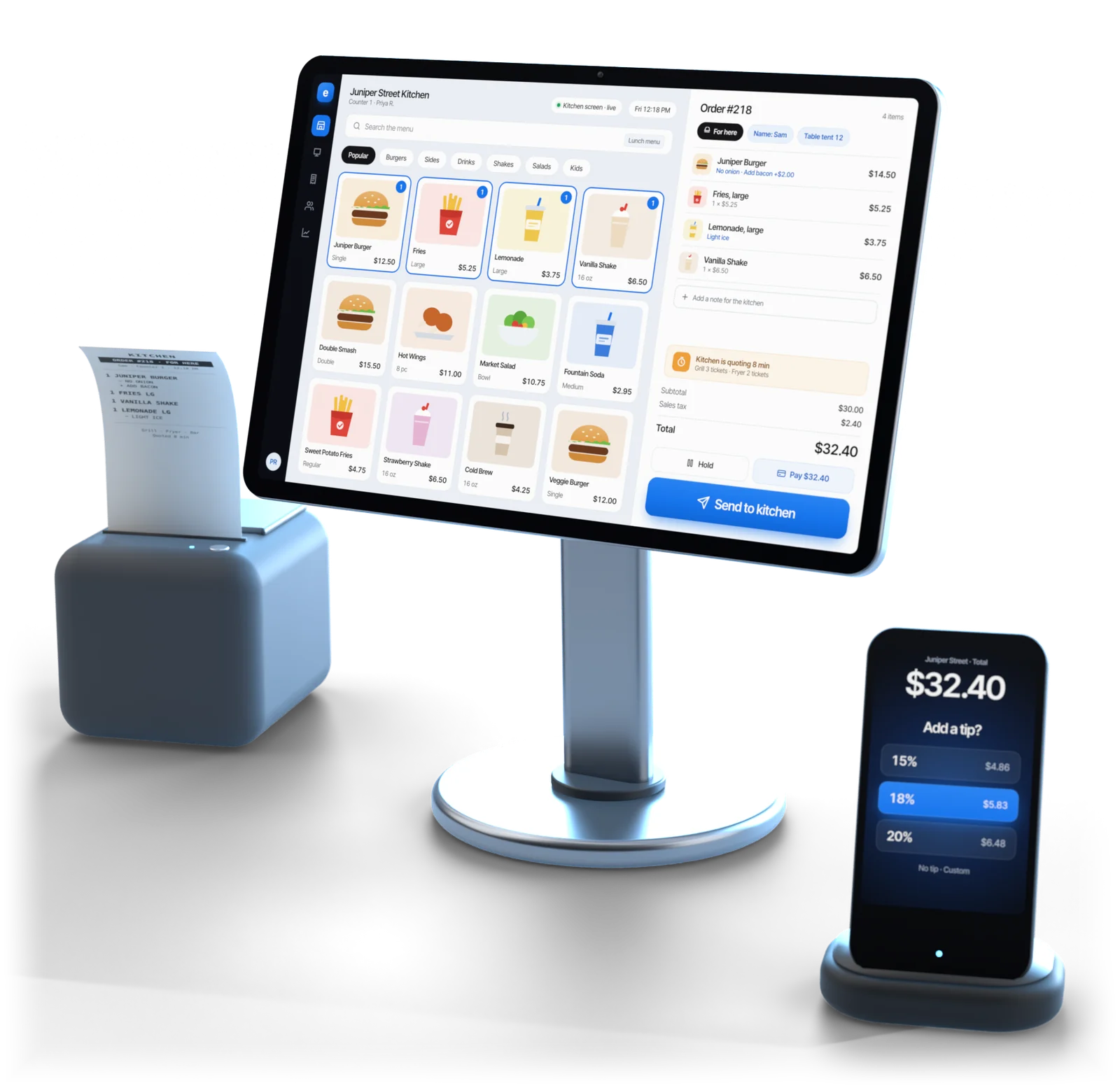
Esplanda POS register showing a counter-service menu and an order ready to send to the kitchen, with a receipt printer and a card reader asking for a tip

Illustrative example

In short

Esplanda POS is a restaurant POS system built for the counter: quick service, cafés, bars, taprooms, bottle shops with a kitchen and delivery-only kitchens. It is free, and it keeps food cost, purchasing and delivery apps on the same catalog.

A full-service room keeps its floor register and runs Esplanda's back office alongside it.

  • Fast counter tickets
  • Bar rounds and ID scans
  • Deposits on cans and crowlers
  • Food cost from invoices
  • Margin by dish

Built for

Built for orders that fire when complete

The dividing line is whether the order is sequenced. When a ticket fires the moment it is complete, counter speed is what matters, and that is the register Esplanda built.

  • Quick service and fast casual

    Orders fire on completion and the line keeps moving: counter speed is the whole job.

  • Cafés and coffee shops

    A small menu, lots of modifiers and a high transaction count, rung fast.

  • Bars and cocktail bars

    Tabs, ID scans and fast repeat rounds, with every age check saved with the sale.

  • Taprooms and breweries

    Pours, plus to-go cans and crowlers with their deposits, on one catalog.

  • Bottle shops with a kitchen

    Retail and food on one register, with case breaks and age checks built in.

  • Ghost kitchens, delivery only

    Orders led by the delivery apps, with little or no counter, on the same catalog.

Table service

Table service keeps its floor, adds our back office

When courses are timed between kitchen and floor, the register your servers already know stays on the floor. Esplanda runs everything around it.

  • Casual full service with table turns. Table management and the server workflow stay on the register your floor runs today.
  • Fine dining, multi-course. Coursing and the kitchen display stay on the register built for them.
  • Banquet and multi-room. Floor coordination and tip pooling stay where your staff run them now.
  • Connected, with no change for staff. If that register is Square, Clover, Lightspeed or KORONA, Esplanda reads its sales and runs food cost, purchasing, delivery apps and reviews on them. See POS integration.

Beyond the register

What sold, and what it earned

A register on its own tells you what sold. Esplanda tells you what it earned, what to buy on Monday and which dish is quietly losing money, whether it rings the sale or reads it from yours.

Food cost from live invoices

Photograph the delivery sheet and Esplanda reads it, matches it to what you ordered, and flags short deliveries you were charged for and price rises nobody mentioned. Corrected costs flow into your dish costs. See invoice scanning software.

Margin by dish

The best seller is very often not the most profitable dish, and few restaurants know which of theirs is which. Esplanda ranks the menu by contribution, not by covers.

Orders from real depletion

Supplier orders written from what actually sold, with each supplier's lead time and minimum applied, ready for your OK. See purchase order software.

Outside the four walls

DoorDash and Uber Eats from one catalog, reviews answered, and campaigns measured against margin instead of opens. See third party delivery integration.

Food cost

How a price increase reaches your menu

Five steps, run the same way whether Esplanda rings the sale or reads it from your register.

  1. The invoice arrives

    Photograph the delivery sheet; Esplanda reads it and matches it to the order.

  2. A cost change is caught

    The case that went up without a call, or three billed and two delivered.

  3. Dish costs update

    Every menu item using that ingredient, at the price you actually paid.

  4. What moved is ranked

    The four dishes that matter, not a list of ninety.

  5. You decide

    Reprice, re-spec or leave it, with the dollar effect estimated and the result recorded.

Two paths

Ring on Esplanda, or connect yours

Counter-service and bar concepts usually take the native path. Full-service rooms usually connect, because floor management is worth more to them than a single catalog. Neither is a downgrade.

Esplanda POS at the counter

  • One catalog: no inventory drift, no nightly reconciliation and no product-matching queue.
  • Free, with the migration and 30 days of running side by side with your old register.
  • No setup fee, no contract and no per-user fees.

Your register, connected

  • Square, Clover, Lightspeed or KORONA stay on the floor, with nothing new for servers to learn.
  • Food cost, purchasing, delivery apps and reviews run on the sales the connection reads.
  • Paid tools are priced on their own, the same on any register.

Questions

Restaurant POS questions owners ask

Is Esplanda a good POS for a restaurant?

Yes, for counter service. Esplanda POS is built for quick service, cafés, bars, taprooms, bottle shops with a kitchen and delivery-only kitchens, where a ticket fires the moment the order is complete. A full-service floor keeps its restaurant register for coursing, table management, the kitchen display and tip pooling, and runs Esplanda's back office alongside it.

Can Esplanda replace my current restaurant POS?

For a counter-service or bar concept, yes, and Esplanda POS is free, with the migration and 30 days of running both registers side by side. A full-service room keeps the register its servers know on the floor; if it is Square, Clover, Lightspeed or KORONA, Esplanda connects to it with no change for staff.

Does a counter-service restaurant need a kitchen display system?

Usually not. When orders fire on completion at a counter, a bar or a pickup window, tickets printed by station to a kitchen printer keep the line moving. A kitchen display earns its place when courses are timed across a multi-course service, and that room keeps the register built for it.

What does Esplanda add that my restaurant POS does not?

Four things: food cost tracked against live supplier invoices rather than a costing sheet from last spring, margin by dish, purchase orders written from real depletion, and the outside work, from delivery apps to reviews and marketing, measured in dollars. A register tells you what sold; Esplanda tells you what it earned.

How does Esplanda calculate food cost?

It reads your supplier invoices: photograph the delivery sheet and Esplanda applies the price you actually paid this week to the recipe behind each menu item. When a case of chicken goes up, the affected dishes are flagged with their new margin, instead of quietly earning less until someone notices at year end.

Can Esplanda manage DoorDash and Uber Eats?

Yes. Marketplace Connectivity keeps menus, prices, availability and hours in step on the DoorDash and Uber Eats accounts you already have, from one catalog, and each app's commission shows inside the margin for those dishes. It is $69 per location per month, for restaurants with at least $2,000 a month of marketplace and delivery revenue, and it works whether Esplanda is your register or connected to yours. Bars and other places that sell alcohol are offered it after legal review. See the DoorDash integration cost in full.

How much does Esplanda cost for a restaurant?

Esplanda POS is $0 a month, with the migration and 30 days of parallel running, and no setup fee, no contract and no per-user fees. The hardware set is free, up to about $3,455 a location, when your projected card processing with Esplanda clears our threshold; otherwise you buy it at list price or use the gear you own. Your website is free too: free hosting, then 99¢ per online order, never more than $299 a month. Paid tools are priced on their own on the Esplanda pricing page.

Does Esplanda handle age verification for a bar?

Yes. Esplanda POS reads the barcode on a driver's license, checks the date of birth and expiry from the ID itself, and saves the check with the sale. It also charges container deposits where they apply, which matters for a taproom selling crowlers. Rules are set by your state and license.

Find out what your menu is really earning

Start free today, or book a demo and we'll walk through the counter, food cost and your delivery apps on a restaurant like yours.

Esplanda POS and your website are free to start, with no card needed. Curious what restaurants near you charge? Run the free price check.

Powered by
esplanda