
One catalog, one stock count
The item sold at 7pm comes off the same record your ordering, pricing and profit reports read.
Point of sale
Every sale updates the stock count and feeds your next supplier order, so there is nothing to reconcile at night, even offline.
Esplanda POS and your website are free to start, with no card needed. Add paid tools only when you want them. Or keep Square, Clover, Lightspeed or KORONA, connected to Esplanda.
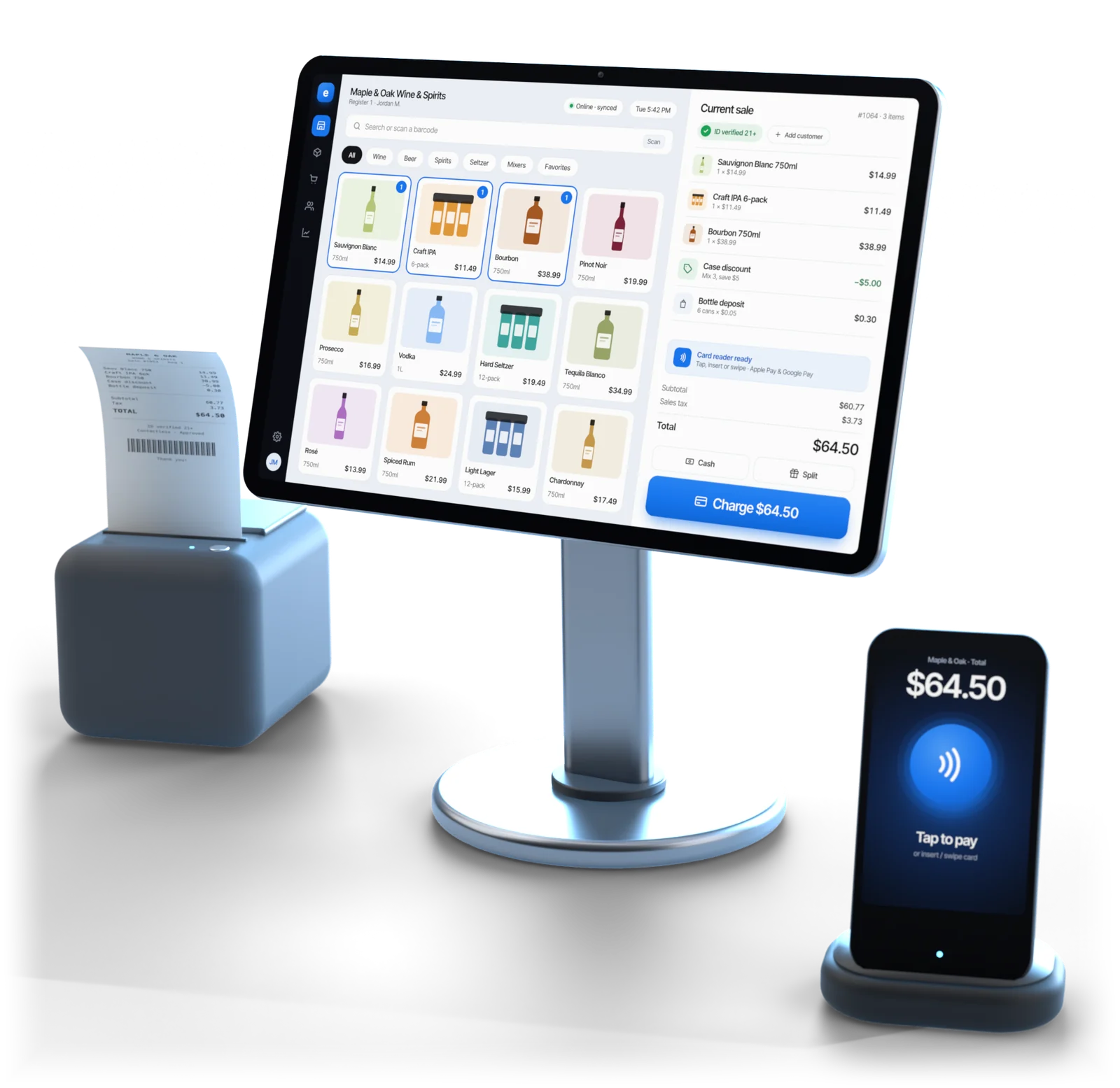
Illustrative example
What it is
An all-in-one POS system with inventory management rings up the sale and takes the item off your stock count in the same step, so reorders start from what actually sold, not from a guess.
The item sold at 7pm comes off the same record your ordering, pricing and profit reports read.
Internet down on a Friday night? The register keeps ringing, printing and scanning IDs, then syncs.
The register reads the code on the back of the license, checks date of birth and expiry, and saves the check with the sale.
Deposits by container, a single bottle from a case, and six mixed bottles at the case price, priced right every time.
A desktop app at the counter, iOS and Android on the floor and in the stockroom, all on one catalog.
Set tax rules, tender types and the receipt layout once, in POS Settings, for every register.
Store-by-store detail: liquor store POS system, grocery store POS system and convenience store POS system.
Rules are set by your state and license. Every ID check is saved with the sale, so your records stay in order.
How it works
Most POS problems aren't register problems. They're two-systems problems: the register knows what sold, something else decides what to reorder, and someone reconciles it on a Sunday. Here, one scan sets off six things.
Price, tax, deposit, deal and any age check are applied at the counter, online or not.
A bottle from a broken case takes one bottle, not the pack. One record per item, no matching queue.
By Esplanda's processing, resold through First American, or by the processor you already have.
Days of cover move right away, not after a nightly import. No inventory drift to chase.
Run-out warnings come early enough to act, and purchase orders are drafted from what sold.
Margin by item and category, not just a sales total.
Offline
Esplanda POS keeps taking money. The catalog, prices, tax rules and the day's sales live on the machine at your counter: a cloud-based POS system that doesn't need the cloud to ring a sale. When the line returns, the day syncs.
| At the counter | During an outage | What happens |
|---|---|---|
| Ringing sales, receipts, cash drawer | Works | Catalog and prices are held on the machine |
| Age check by ID scan | Works | Date of birth and expiry are read on the device |
| Deposits, case breaks, mix-and-match | Works | Pricing rules run on the device, not on a server |
| Refunds and voids | Works | Queued and matched up when the line returns |
| Card payments | Your terminal's offline rules | Approval needs a line to the processor, whoever processes |
| Live reports on your phone | Waits for sync | Correct as of the last sync, then catches up |
| Items added at another location | Waits for sync | Matters to groups that share one catalog |
A register that stops at 6:10 on a Friday doesn't lose one sale; it loses the line. Esplanda POS keeps the line moving through the outage and syncs the day when the connection returns.
Buyer's checklist
Most registers can hold a stock number. A POS inventory system worth paying for keeps that number right through sales, deliveries and counts, and turns it into your next order.
| What to check | Why it matters | Esplanda POS |
|---|---|---|
| Stock tracked by the real unit | Sell one bottle from a case and the count should drop by one bottle, not the whole case, or it drifts from day one | Every sale, void and refund writes to one stock record, in the unit you sell and the case you buy |
| Low-stock alerts in time to act | An alert that fires when the shelf is already empty costs you the weekend | Run-out warnings, worked out from what actually sells |
| Reorders from what sold | Ordering from memory overbuys slow lines and misses fast ones | Purchase orders drafted from sales; approve each in one tap, or let them go inside your limits |
| Counts without closing | A once-a-year count finds problems months after they start | Cycle counts on a phone while the store stays open, with every gap ranked in dollars |
| Deliveries checked at the door | Stock that was invoiced but never arrived shows up later as shrink | Each delivery checked against its order at receiving |
| Online orders on the same count | A web shop with its own stock list sells items you no longer have | Your online shop sells from the register's stock count; see our POS with online ordering |
| Margin by item | A sales total hides the items that lose money | Margin by item and category in the daily report, from received costs |
Counting, shrink and dead stock in depth: our retail inventory management software.
Pricing
Keep the register you have, or use ours. Both are real offers; ours is the simpler one, because one catalog leaves nothing to match or reconcile.
$0
No monthly fee, no setup fee, no contract and no per-user fees, with the migration and 30 days of parallel running, on the computer, tablet or phone you already have. You add only the paid tools you want.
Connected
Square, Clover, Lightspeed or KORONA stay at the counter and connect to Esplanda: the right call whenever switching would disturb something that works. See our POS integrations.
Bought onceor use the computer, tablet or phone you have
Run Esplanda POS on the Windows or Mac computer, tablet or phone you already have, with standard printers, cash drawers, scanners and ID readers. Or buy the tested hardware set once at list price, from $739 for a terminal, and own it. See POS hardware.
Optional
From 2.79% + $0.10 in person and 2.89% + $0.30 online, through First American Payment Systems (a Deluxe company), which Esplanda resells. Your rate is set when First American approves your account, from your current statement. Or keep your processor: Esplanda POS is free either way, and every software price is the same. See credit card processing for small business.
See full Esplanda pricing.
Switching
Installing the app takes an afternoon. A single store moves across in about a week, from the first import to the day the old register comes off the counter, with the catalog checked on the way in. The migration is free, and so are 30 days of running the old register alongside.
Already connected to Esplanda? Your items are matched already, which shortens the move.
Moving a liquor store, with sizes, packs and deposits? See the liquor store POS system. For customers, order history and your website too, see POS data migration.
On the computer at the counter, and on the tablets or phones you use on the floor.
An export from Square, Clover, Lightspeed or KORONA comes straight in; any other register's item list comes across as a spreadsheet. Sizes, packs and deposits are set on the way in.
A sample from every aisle, especially singles sold from a pack and anything with a deposit.
One short walkthrough at the counter, before the first shift on the new register.
Compare the totals with your old register. Where they differ, the fix is nearly always in the catalog, not the register.
Retire the old register once the side-by-side totals agree. With several stores, move one first and use its setup as the pattern for the others.
Built for
Built for the counter: independent stores that ring the sale, check the ID and count the stock in one system, and keep selling when the internet drops.
Questions
It is a point of sale where every sale updates the same stock record your ordering and pricing use. Esplanda POS works this way: the register, stock counts, purchase orders and margin reports share one catalog, so there is no nightly import and nothing to reconcile between two systems.
Every sale takes the item off your stock count the moment it's rung, so stock on hand, low-stock alerts and reorders start from what actually sold. With Esplanda POS, counts and deliveries correct that same record, and purchase orders are drafted from it.
Yes. Esplanda POS is offline-first: the catalog, prices, tax rules and the day's sales live on the machine at the counter, so staff keep ringing sales, printing receipts, opening the drawer and scanning IDs. Live reporting catches up when the connection returns, and card approvals follow your terminal's offline rules.
No: keep the register you have, or use ours. Esplanda connects to Square, Clover, Lightspeed and KORONA, with no change at the counter. Esplanda POS is free and is the better path, because one system means no inventory drift and no nightly reconciliation.
Install the app on the counter computer and any tablets or phones, then import your item list from a Square, Clover, Lightspeed or KORONA export, or a spreadsheet from any other register. Check sizes, packs and deposits as they come in, spot-check prices with a scanner, walk your staff through it and run one shift beside the old register. Allow about a week for a single store, from the first import to your first full day on Esplanda POS.
Nothing. Esplanda POS is free, with the migration and 30 days of parallel running, and with no setup fee, no contract and no per-user fees. It runs on the computer, tablet or phone you already have, or you buy the tested hardware once at list price. You add only the paid tools you want, and every current price is on the Esplanda pricing page.
Yes: Esplanda processes card payments as a reseller for First American Payment Systems, a Deluxe company, from 2.79% + $0.10 in person and 2.89% + $0.30 online. Your rate is set when First American approves your account, from your current statement, and First American approves, funds and owns your merchant account. Payments are optional: Esplanda POS runs on the processor you already have, and it is free either way.
The computer, tablet or phone you already have: a desktop app on the Windows or Mac computer at your counter, plus iOS and Android apps, with standard receipt printers, cash drawers, barcode scanners and ID readers. A tested hardware set is optional: a Volcora terminal is $739 to $1,099 and a cash drawer starts at $39.95, bought once and yours to keep.
Start free today, or book a demo and we'll walk through Esplanda POS on a store like yours.
Esplanda POS and your website are free to start, with no card needed. Add paid tools only when you want them.
