
POS hardware
POS hardware we've tested, or the gear you already have
Use the computer, tablet or phone you have, or buy our tested set once and own it.
Esplanda POS and your website are free to start, with no card needed. Add paid tools only when you want them. See how Esplanda works.
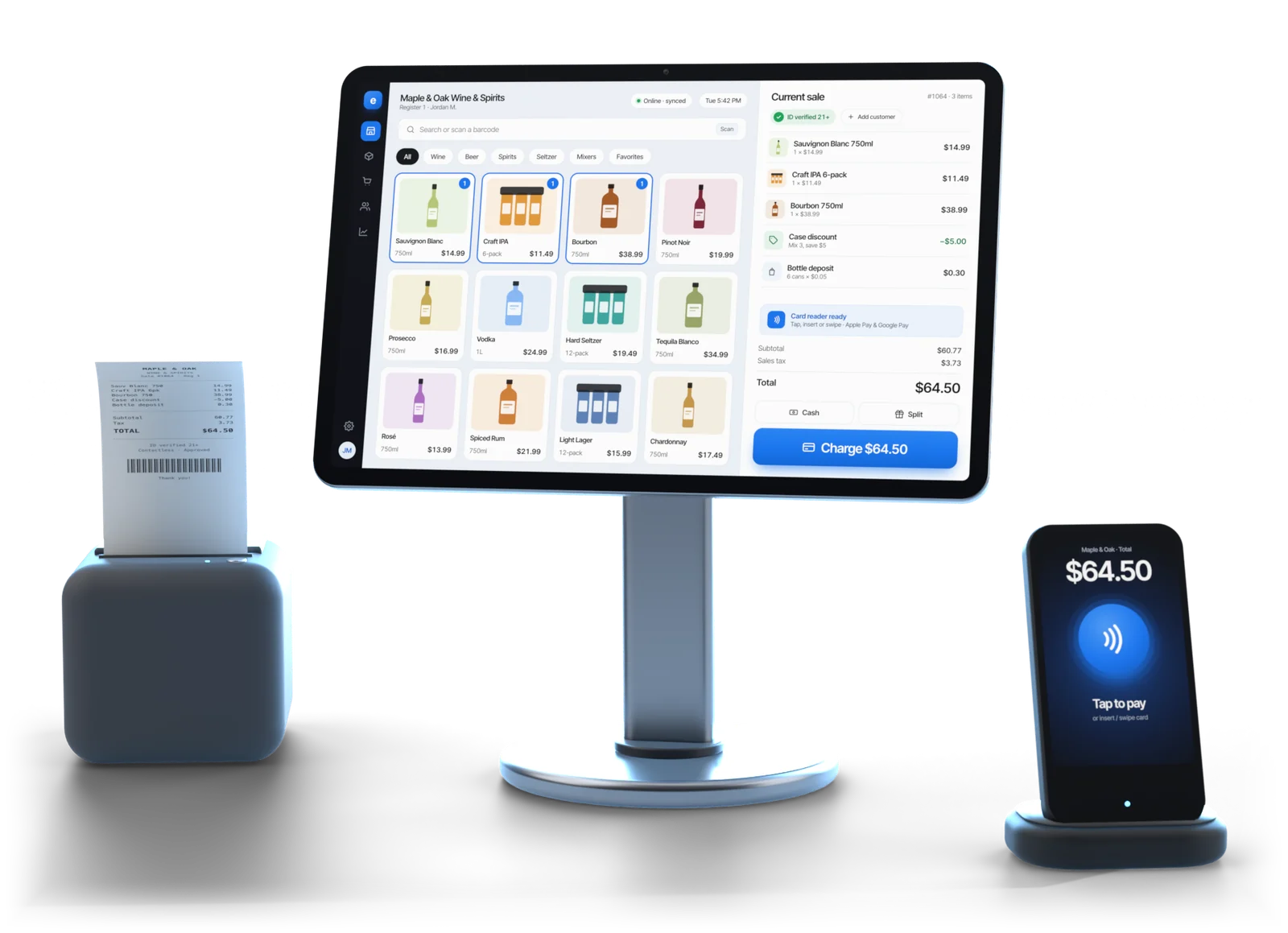
Illustrative example
Point of sale hardware and equipment, piece by piece
The Volcora set Esplanda has tested and stocks: terminals $739 to $1,099 and cash drawers from $39.95, bought once, with printers, scanners, stands and drop safes priced by model. Buy once, own it, or keep using what you have. Every piece is optional.
POS terminal
$739 – $1,099
Volcora all-in-one, in the screen size and configuration that fits your counter.
Cash drawer
From $39.95
Wired to the terminal; opens on a cash sale even during an internet outage.
Receipt printer
By model
Thermal and wired, so it keeps printing during an internet outage.
Barcode and 2D ID scanner
By model
A license's PDF417 code needs a 2D reader, which reads products too. See the liquor store POS system.
Terminal stand
By model
Keeps the screen where the line can see it. Add one when the counter needs it.
Drop safe
By model
Keeps the day's cash out of the drawer until the bank run. Add one when the store needs it.
A first counter fitted out new lands at roughly $900 to $1,300 at list price: the terminal, a drawer, a printer and a scanner, tested together. You buy it once and it is yours, with no lease and no monthly device fee.
| Software and service | Price |
|---|---|
| Esplanda POS software | Free, with no monthly charge for the register itself |
| Migration and 30 days of parallel running | Free when you move your register to Esplanda POS |
| Terminal swap | $99 per swap, when a terminal has to be replaced |
| Pin pad swap | $30 per swap |
Card processing is separate from hardware: from 2.79% + $0.10 in person and 2.89% + $0.30 online, resold through First American Payment Systems, a Deluxe company. Your rate is set when First American approves your account, from your current statement. See credit card processing for small business.
See full Esplanda pricing.
Hardware is optional
Works with the gear you already have
The supported list tells you what's known to work, not what you're allowed to buy.
- A desktop app. The POS system with inventory management installs on the Windows or Mac computer at your counter and runs as it does on a new terminal.
- Tell us the make and model. Esplanda POS runs with standard printers, cash drawers, scanners and ID readers, so the standard gear already on your counter stays in use. Volcora gear is tested together, and Esplanda support walks you through it.
- Tablets for the floor. The iOS and Android apps cover the floor, the stockroom and curbside, on the same catalog.
- Or change nothing at the counter. Esplanda connects to Square, Clover, Lightspeed and KORONA. See our POS integrations.
Illustrative example
Setting up
How to set up a new register
Six steps, and none of them needs a technician on site.
Tell us what's on your counter
Make and model of the printer, drawer, scanner and ID reader.
Fill only the gaps
Need only a 2D scanner for licenses? Take that and nothing else.
Install Esplanda POS
On the Windows or Mac computer at the counter. It's a download.
Plug in and pair
Printer, drawer, scanner and pin pad, then print a test receipt.
Load the catalog and practice
Tax rules and tenders too, then five practice sales: a deposit, a broken case, an ID check.
Train the shift
On a slow Tuesday, not in front of a Friday line.
Buying guide
What to check before you buy POS hardware
POS hardware is the kit at the counter: the terminal or computer, receipt printer, cash drawer, scanners and card reader. Six checks decide whether it holds up on a Friday night.
Software that isn't tied to the box
Esplanda POS installs on any Windows or Mac computer, so a dead terminal means a reinstall on a spare machine. That is what a hardware-agnostic POS gives you.
Wired at the counter
A wired printer, drawer and scanner keep working through an internet outage and a rush. Tablets on the iOS and Android apps suit the floor, stockroom and curbside.
A 2D scanner if you sell alcohol
The PDF417 code on a driver's license needs a 2D reader. A combination scanner reads products too, so one device covers both.
Bought once, yours to keep
The Volcora set is bought once at list price, with no lease and no monthly device fee, and it is yours. The software is a free POS system either way.
A card reader for your processor
The pin pad pairs with the terminal and approves through your processor, or through Esplanda's. Comparing processors? Work out your effective rate from one statement first.
A plan for your data
Switching registers? Keep the standard gear that works, add only the gaps, and move your items, customers and history with POS data migration.
When something breaks
When something breaks, you keep selling
Esplanda POS runs on any Windows or Mac computer, so a dead terminal means a swap, not a closed register.
When a terminal dies on a Saturday
- The replacement ships to you when a terminal or pin pad has to be swapped: $99 for a terminal, $30 for a pin pad.
- The sale survives. The register is offline-first: catalog, prices and sales live on the machine.
Ringing again the same afternoon
- Any spare computer will do. Install Esplanda POS on a spare Windows or Mac machine and ring again the same afternoon.
- Same catalog, same settings. The spare rings on the same catalog, with the tax rules, tenders and receipt layout set once in POS Settings for every register.
What keeps running when things go wrong: why Esplanda is safe to trust.
Esplanda supported hardware
Compared with own-brand terminals
Esplanda supported hardware is bought once, with no monthly device fee, and the software is never locked to the box: reinstall it on any Windows or Mac computer.
| Consideration | Own-brand terminals | Esplanda supported hardware |
|---|---|---|
| Who makes it | Own-brand, built for their software | Volcora, plus any standard gear you already own |
| Terminal price | Own-brand pricing, often bundled or financed | $739 – $1,099, one-time, and yours to keep |
| Your existing gear | Limited to their approved devices | Standard printers, drawers, scanners and ID readers work |
| Software if the box fails | Generally tied to their device | Reinstall on any Windows or Mac computer |
| Selling during an outage | Varies by product and mode | Offline-first: keeps ringing sales |
| Monthly hardware cost | Often a monthly device or lease fee | None; the software is free |
Questions
POS hardware questions owners ask
What POS hardware do I actually need?
A computer at the counter, a receipt printer, a cash drawer, a barcode scanner and a 2D reader for IDs. Esplanda POS runs on standard Windows and Mac computers with standard printers, cash drawers and scanners, so gear you already own can stay on the counter. The Volcora list is the supported set: gear Esplanda has tested, stocks and supports.
How much does a POS terminal cost?
Volcora POS terminals run $739 to $1,099 depending on the configuration, and cash drawers start at $39.95. Receipt printers, barcode scanners, terminal stands and drop safes are priced by model. Hardware is a one-time purchase, not a monthly lease, and it is yours. Gear you already own can stay on the counter too.
Do I have to use hardware from Esplanda?
No. Run any hardware you like; the Volcora list is the supported set, not a requirement. Taking it means Esplanda has tested that exact combination, and Esplanda support can walk you through it instead of guessing at a driver.
What happens if my terminal breaks?
You keep selling. Install Esplanda POS on any spare Windows or Mac computer and it rings sales the same day, on the same catalog. When a terminal or pin pad has to be swapped, the replacement ships to you: a terminal swap is $99 and a pin pad swap is $30.
Is hardware part of what I pay Esplanda every month?
No. Hardware is bought once, separately, and it is yours, with no monthly device fee and no lease. The software that runs on it is free. You pay only for the paid tools you choose to add, and every current price is on the Esplanda pricing page.
What is a hardware-agnostic POS system?
It is a point of sale whose software runs on standard computers and peripherals rather than on one vendor's own terminals. Esplanda POS is one: it installs on any Windows or Mac computer and works with standard receipt printers, cash drawers, barcode scanners and ID readers, which keep working through an internet outage.
Do I need a special scanner to check IDs?
You need a 2D reader, because the PDF417 code on the back of a driver's license is not a regular product barcode. Combination scanners in the Volcora list read both, so one device covers products and licenses. Esplanda POS reads the date of birth and expiry and saves the check with the sale.
Can I run the register on a tablet instead of a terminal?
Yes for the floor, the stockroom and curbside, using the iOS and Android apps. For the main counter, a fixed terminal with a wired printer, drawer and scanner holds up to a busy rush better than anything on Wi-Fi.
Set up the counter without buying what you don't need.
Esplanda POS and your website are free to start, with no card needed. Buy the tested hardware once, or use what you have. Add paid tools only when you want them.
