
Convenience stores

Free convenience store POS system, ID scan built in

Scan IDs for beer and tobacco, ring deals and deposits, keep selling offline, and approve reorders Esplanda drafts for you.

Esplanda POS and your website are free to start, with no card needed. Add paid tools only when you want them. Not ready to start? Get your free price check. See how Esplanda works.

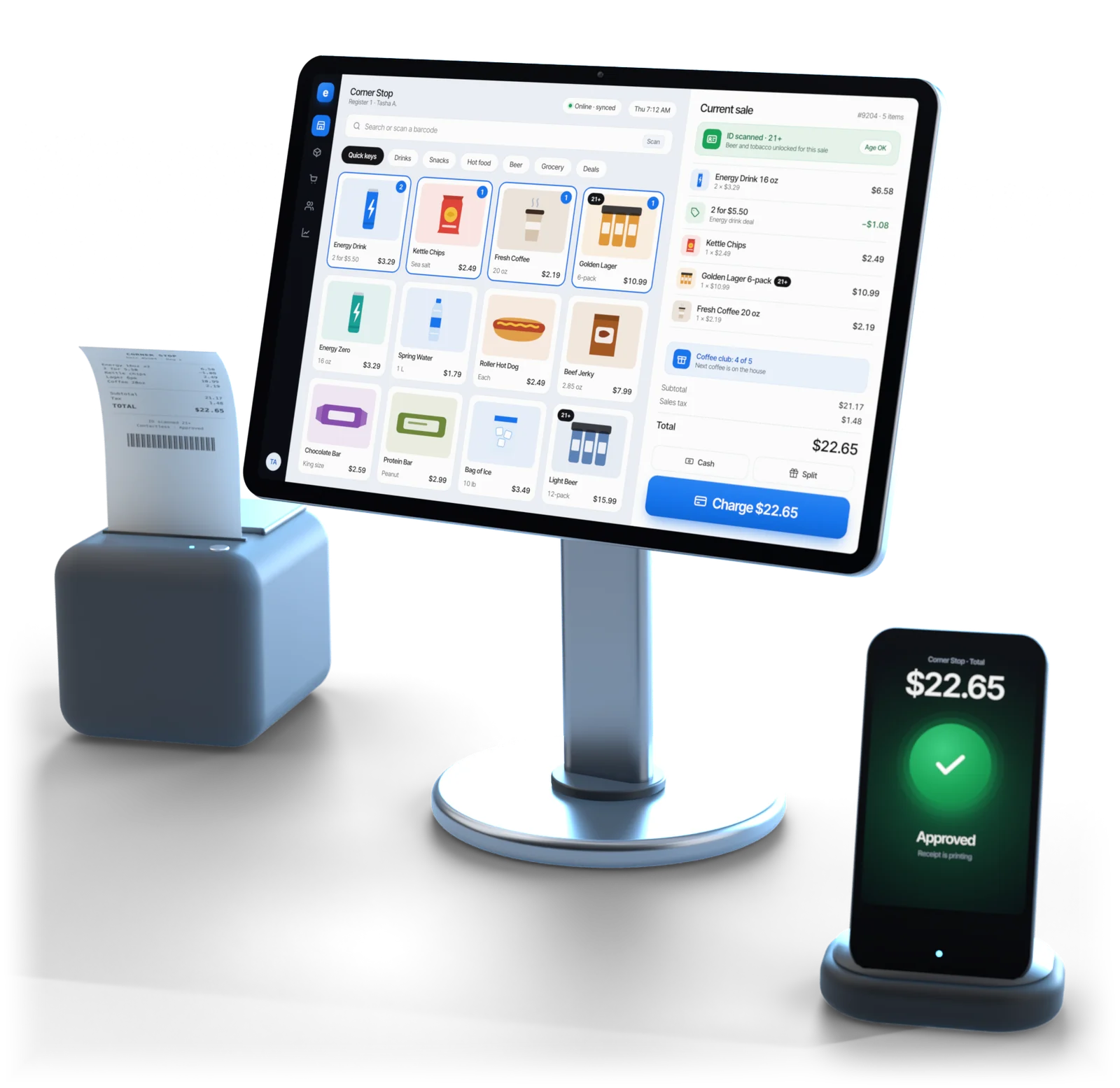
Esplanda POS register showing a convenience store sale with the ID scanned, a receipt printer and a card reader showing the payment approved

Illustrative example

At the counter

What a convenience store POS system needs, and what it works with

A c-store rings small baskets all day and checks IDs on the beer and tobacco. Here is what keeps a convenience store point of sale fast, what Esplanda POS runs, and the equipment that stays just as it is.

On Esplanda POS

  • ID scans for beer, wine, tobacco and vapes, with an underage block; the check is saved without a name or address.
  • Deals and combos applied at the counter, every discount recorded.
  • Hold and recall: park a sale, ring the next customer, pick it back up.
  • Can deposits and tax by item or category.
  • Keeps selling offline, then syncs.
  • Clerk sign-in and a cash count at every shift close.

Works with your equipment

  • Your lottery terminal.
  • Your fuel pumps.
  • Your money orders.
  • Your EBT setup, for those sales.

They stay right where they are, and Esplanda POS rings everything else in the store. Or keep your current register through our POS integrations.

Card processing stays with the processor you already use, every software price is the same on it, and everything in Esplanda works as usual. More on credit card processing for small business.

Behind the counter

Ordering, prices and regulars, in the same system

Good convenience store inventory software knows the energy drinks go by Friday. Esplanda spots the work and gets it ready for your OK.

Orders before the morning rush

Drinks, snacks and coffee supplies come from different vendors on different days. Esplanda plans around each delivery day.

  • Run-out warnings for the cooler, the snack aisle and the coffee station, in time for the next delivery.
  • Vendor orders, drafted for each delivery day, in case packs and above minimums, free in Esplanda POS.
  • Dead stock after 90 days, and short cases flagged from the invoice photo.
  • Shrink in dollars from every count, per item and per category, so you see where stock goes missing.

See our purchase order software, inventory management for small business and invoice scanning software.

Prices people notice

A supplier raises the cost of a case and your shelf price stays put. Esplanda catches it from the invoice.

  • A new shelf price with a tag ready to print, staged for one tap or moved inside your margin floor and price rules if you allow it.
  • Nearby prices on the drinks and snacks people compare, never below your margin floor.
  • A price move near your floor, or larger than your maximum move size, always waits for your OK.

Daily tracking of nearby prices is the Competitor Intelligence add-on, $299 a month. Esplanda reads only the prices other stores post publicly, and every price you set stays your own.

The free price check shows what comparable stores near you charge. How competitor price tracking works, and why Esplanda is safe to trust.

Regulars and online orders

Your best customers come in every morning. Esplanda notices when one stops.

  • The morning regular who stops coming gets a win-back offer inside your discount limit, with Marketing — Do It Yourself ($199 a month per location; Grow My Business, $699, contains it, so the two are never billed together).
  • Loyalty points at the register, free in Esplanda POS, from one customer list built from register sales.
  • Right on Google and Maps: late-night and holiday hours checked ahead of every holiday, in the same marketing line, and review replies drafted in your voice for your OK with Reviews & Reputation ($79 a month).
  • Your own online store for pickup and delivery, from the same stock count: free hosting, then 99¢ per online order, never more than $299 in a month.

See our customer loyalty software and POS with online ordering.

Your register

Keep your register, or switch

Keep yours

Keep the register you have

If your counter already runs Square, Clover, Lightspeed or KORONA, keep it: Esplanda connects to it, and Esplanda POS stays free for the day you switch.

Or use ours

Switch to Esplanda POS

Free. Every coffee, can and carton comes off the same stock count your run-out warnings read, so there's nothing to reconcile after close. See the full POS system with inventory management.

Switching, step by step

The catalog is the real work: age-restricted items, deposits and deals need the most care.

  1. Export your item list, cooler and tobacco case included, from Square, Clover, Lightspeed or KORONA, or as a spreadsheet from any other register.

  2. Mark age-restricted items: beer, wine, tobacco and vapes, each with its minimum age, so the register asks for ID every time.

  3. Set can deposits, tax and combo deals once; after that the register rings them the same way on every shift.

  4. Connect the counter: scanners, ID scanners, receipt and label printers and the cash drawer, tested before the first sale.

  5. Ring on both registers side by side, free for up to 30 days, and compare shift totals; a gap usually points to one item set up wrong.

  6. Go live. Take the old register off the counter; the lottery and fuel equipment stay where they are.

Built for

Who Esplanda is built for

Built for independent c-stores

  • Independent c-stores and corner stores, one location or a few. A store that is mostly wine and spirits runs on our liquor store software, and a bigger basket with fresh departments on our grocery store POS system.
  • Stores that sell beer, wine and tobacco and want every ID check on record.
  • Owners who want vendor orders and price tags ready, with the final say.

Works with what you have

  • Your register: keep Square, Clover, Lightspeed or KORONA connected to Esplanda, with Esplanda POS free whenever you switch.
  • Your lottery, fuel and money-order terminals stay right where they are.
  • Your processor: card processing stays with the processor you already use, and every software price is the same on it.
  • Esplanda POS$0
  • Your website$0
  • Per online order99¢
  • Most in a month$299

Migration and 30 days of parallel running come free with Esplanda POS, which runs on the computer, tablet or phone you already have · Email and chat support free · Paid tools priced one by one, per location per month · Card processing stays with the processor you already use · No setup fee, no contract, no per-user fees · No card needed to start

Questions

Convenience store POS questions owners ask

What is the best POS system for a convenience store?

The best POS system for a convenience store checks IDs for beer and tobacco, rings deals and deposits fast, holds a sale while the next customer pays, and keeps selling when the internet drops. Esplanda POS does all four on desktop, iOS and Android, and it is free.

Can the register check IDs for beer and tobacco?

Yes. Mark an item age-restricted and Esplanda POS reads the barcode on a driver's license or ID, checks the date of birth and expiry, and blocks the item if the buyer is too young. The check is saved with the sale without keeping the customer's name or address.

How does Esplanda POS work with lottery, fuel and EBT?

They stay just as they are. Lottery terminals, fuel pumps, money orders and EBT each run on their own certified equipment at the counter, and Esplanda POS rings everything else in the store.

Can I keep my card processor?

Yes. Card processing stays with the processor you already use, Esplanda POS is free either way, every software price is the same, and everything in Esplanda works as usual.

How does a convenience store POS system handle a rush?

By keeping every sale short: scanned items, deals and combos that apply themselves, a license scan instead of mental math on a birth year, and hold and recall so one slow sale doesn't stop the line. Esplanda POS also keeps ringing offline, so a dropped connection doesn't stop the rush either.

Does the register keep working if the internet goes down during the morning rush?

Yes. The register keeps ringing coffee, drinks and snacks with their deals and deposits, and keeps checking IDs on beer and tobacco, then syncs when the connection returns. Card payments follow your card terminal's offline rules.

Do I have to replace my current convenience store register?

No. If you switch, your age-restricted items get their minimum ages and your scanners, ID scanners and cash drawer are connected, while the lottery terminal and fuel equipment stay where they are. Keep the register you have, or use ours: a Square, Clover, Lightspeed or KORONA register stays connected to Esplanda, and Esplanda POS is free whenever you switch.

How much does a POS system for a convenience store cost?

With Esplanda the register is free: Esplanda POS comes with the migration and 30 days of parallel running at no charge and runs on the computer, tablet or phone you already have, and your website is free too, apart from 99¢ per online order, never more than $299 in a month. If you want new gear, tested POS hardware is a one-time purchase. You add only the paid tools you want, each priced on its own per location per month, with no setup fee, no contract and no per-user fees. Card processing stays with the processor you already use. Every current price is on the Esplanda pricing page.

Run your convenience store on one system

Start free today, or book a demo and we'll walk through Esplanda on a store like yours. Not ready to start? Get your free price check to see what comparable convenience stores near you charge.

Esplanda POS and your website are free to start, with no card needed. Add paid tools only when you want them.

Powered by
esplanda