
Demand forecasting
Demand forecasting software that tells you what to stock
Esplanda forecasts each item's sales from your own history, the season, holidays and weather, as a range with its confidence.
Demand forecasting is part of the free Esplanda POS: no monthly fee, no setup fee, no contract. See Esplanda pricing.
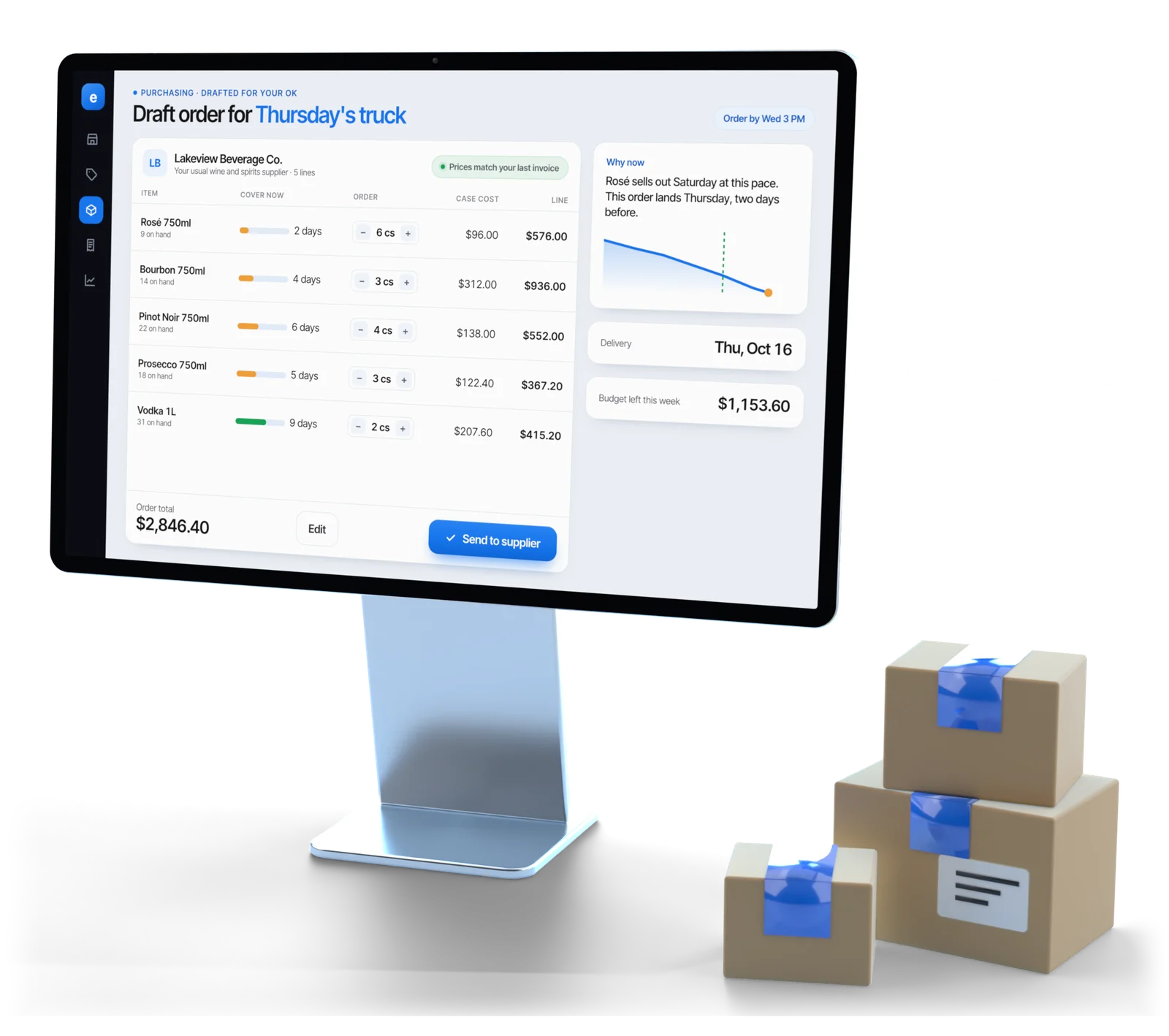
Illustrative example
The signals
The signals inside every forecast
Almost every bad forecast comes from mixing these up, so Esplanda measures each one separately, item by item. Forecasts start from your first two to four weeks of connected sales and sharpen as a full year comes in.
| Signal | What it is | History it needs |
|---|---|---|
| Weekly rhythm | The shape of a normal week. Friday is not Tuesday. | 2–4 weeks |
| Trend | A steady direction that doesn’t repeat, like an item growing a little every month. | 8–12 weeks |
| Seasonality | A pattern tied to the calendar, like rosé in June and sparkling wine in December. | A full year, ideally two |
| Holidays and events | Holidays, game days and local festivals, planned from the same date last year. | The same event once before |
| Weather | Hot weekends move ice, cold drinks and beer, where your own history shows it. | One season of matched sales |
Past sales from your register’s export come in at setup, so your forecasts start with your own history. New items borrow from similar ones, with their confidence shown.
Ranges
A range, labeled as a forecast
“You will sell 47.”
A single number reads as knowledge and invites an order the sales data doesn’t back.
“38 to 56, low confidence: this item sells four times a month.”
Reads as what it is, and leads to a better order.
- Always labeled. Every forecast in Esplanda is marked as a forecast, next to the real sales and stock it came from, so you always know which numbers are measured and which are forecast.
- Different items, different rules. Fast, steady sellers get tight forecasts. Slow, irregular items are forecast conservatively, because over-ordering them costs more than a gap. Perishables are forecast from demand, not an old par level.
Whatever a vendor calls its forecast, ask to see the range and the track record. Esplanda shows you both.
The calendar
Holidays, events and weather, planned before they arrive
A holiday list tells you a date exists, and a forecast draws a smooth curve. Neither gets the beer into the cooler before the big game weekend. Esplanda adds each outside factor to your forecast where your own history shows it matters for your store.
- Holidays by their shape. A Fourth of July on a Thursday spreads demand across four days; on a Monday it piles into the weekend before. Esplanda forecasts from the same holiday last year, adjusted for your current trend.
- Weather, per category. Temperature moves ice, cold drinks, beer and grill items; rain can cut foot traffic. Adjustments apply only where your history shows them.
- Game days and local events. A televised game moves beer and snacks on a schedule published months ahead. A festival can double a Saturday on one block and do nothing three streets away.
In a liquor store, game days and holiday weekends move beer, wine and spirits; see our liquor store software.
From a date on the calendar to stock on the shelf
A commercial calendar lists the dates when demand in your store will do something other than normal, each with an estimated dollar value and the decisions that have to be made in advance.
- A dollar range, and where it came fromEach date carries its expected lift as a range in dollars, never one multiplier, with its source: your own history, or, for a date your store hasn’t seen yet, an anonymous pool of similar stores, shown as borrowed. How those pools work, and the size each one needs: retail benchmarking.
- Bought on each supplier’s lead timeEach decision comes up when its own lead time says so, so the extra stock lands before the date instead of everything arriving on one day. Esplanda drafts the order in our purchase order software for your OK, or sends it under your limit if you have allowed that.
- Weather that ends in an orderA hot Saturday is a reason to act. Esplanda checks what can still be done about it, like a supplier who can still deliver in time, and drafts the order. Weather alerts come only while there’s still time to act on them.
- Tastings measured against a normal periodChoose what to pour on margin and stock on hand, then see the units sold on the day and in the weeks after, against a comparable normal period. Every tasting is scored in dollars, and a pairing that lost money drops off the list. See how we measure results.
Rules that don’t bend. Esplanda never guesses the religion, ethnicity or national origin of your customers: an occasion is on your calendar because your own sales moved on it, or because you added it. And the calendar never changes anything in your store by itself; every order it leads to follows your settings and your limits. Permits and pour limits for tastings are enforced as hard limits, set by your state and license.
Checking accuracy
How to check a demand forecast, step by step
Run this test on any forecasting software. Esplanda reports its own accuracy against these same baselines.
Fix the horizon
Judge a seven-day or a twenty-eight-day forecast, not both at once. Being good at one and weak at the other is normal.
Measure in units and dollars
Percentages flatter slow sellers, where one unit out looks like a huge miss on an item nobody cares about.
Beat the simple baselines
Last week repeated, and the same week last year. A forecast that can’t beat both isn’t earning its keep.
Check which way it leans
Add up the signed errors over a month. A steady lean one way turns into growing overstock or repeat run-outs.
Score item types separately
Fast and steady, seasonal, slow and irregular, brand new. One blended number hides the failures you were looking for.
Check again every month
A road closure, a new store nearby or a heatwave changes the pattern. Accuracy is a running measurement.
Ordering
Inventory forecasting that ends in a full shelf
- Run-out warnings in days. Esplanda compares the forecast with stock on hand and the supplier’s lead time. “Nine days of cover, six-day lead time” tells you to order today.
- Orders drafted from it. Esplanda drafts supplier orders from the forecast, with lead times, case packs and minimums applied first. You approve each one in one tap, or let Esplanda send the ones that sit inside the limits you set once. See our purchase order software.
- Your limits hold. An order above the limit you set always waits for your approval, however much you have handed over. Read why Esplanda is safe to trust.
- Counts keep it accurate. A forecast subtracts from stock on hand, so the count matters: see retail inventory management software. Before a busy weekend, check nearby shelf prices with competitor price tracking.
- Sharpest on Esplanda POS. Forecasts read sales and stock from one record, so every item keeps one unbroken history. Keeping your register works too, with new items paired in the matching queue. Compare the POS system with inventory management and our POS integrations.
Choosing a tool
How to choose demand forecasting software for a small store
Most demand forecasting tools are built for supply chains. A store needs each item forecast from its own register, then turned into an order. Esplanda forecasts from the same sales your POS reporting reads, free in Esplanda POS.
| Question | Spreadsheet or last year’s order | Enterprise demand planning suite | Esplanda |
|---|---|---|---|
| Built for | Whoever orders, from memory | A planning team running a supply chain | The owner of an independent store |
| What it learns from | Last year’s totals | Data gathered from an ERP and other company systems | Your register’s sales, item by item, with past sales imported at setup |
| What you see | One number, with no confidence | Forecasts for planners to review and adjust | A range with its confidence on every item, labeled as a forecast |
| What happens next | You write the order | A separate replenishment or ERP step | An order per supplier, with case packs, minimums and lead times applied |
Demand forecasting
How much of each item will sell in a future period, from past sales and what moves them.
Demand planning
The decisions built on the forecast: what to buy, how much and when. In a store, that decision is the purchase order.
AI demand forecasting
A forecast that learns each item’s pattern from your own sales and outside signals like holidays and weather. Whatever the label, ask for the range and the track record.
Questions
Demand forecasting questions owners ask
What is demand forecasting software?
Demand forecasting software estimates how much of each item you will sell in a future period, from past sales and the known factors that move them, such as the day of the week, the season, holidays and weather. Good software forecasts item by item, shows a range with a confidence level, and labels every number as a forecast.
How accurate is demand forecasting, and how do I check it?
Accuracy follows the item. Fast, steady sellers with a year of history forecast tightly; for slow, irregular items Esplanda shows a wider range and orders conservatively, so you carry less stock you don't need. To check a forecast, see whether it beats last week repeated and the same week last year, measure the misses in units and dollars, add up the errors to see which way it leans, and score fast, seasonal, slow and new items separately.
How much sales history do I need to forecast demand?
Roughly two to four weeks of connected sales gives a useful forecast, and a full year gives a good one, because the software can see the same season twice. In between, Esplanda widens its ranges on seasonal items and says which ones those are. Importing past sales from your register at setup skips most of the wait.
What is the difference between seasonality and trend?
Seasonality is a pattern that repeats on the calendar, like rosé in June or sparkling wine in December. Trend is a steady direction that doesn't repeat, like an item that has grown every month this year. Mixing them up is the most common forecasting mistake, and it usually shows up as over-ordering in January.
How do I forecast demand for a holiday weekend?
Forecast against the same holiday last year, adjusted for your current trend, not against last week. Esplanda also allows for the shape of the calendar: a Fourth of July on a Thursday spreads demand across four days, while one on a Monday piles it into the weekend before. Each date carries its expected lift as a dollar range with its source, and the extra stock is timed to each supplier's lead time so it lands before the weekend.
How do I choose demand forecasting software for a small store?
Choose one that forecasts each item from your own register sales, shows a range with its confidence, plans for holidays and weather where your history shows them, and turns the forecast into a supplier order with case packs, minimums and lead times applied. Then test it: it should beat last week repeated and the same week last year. Esplanda does each of these, free in Esplanda POS.
Does Esplanda order stock automatically from the forecast?
Only if you switch that on. Esplanda writes supplier orders from the forecast, timed to each supplier's delivery day. You approve each one in one tap, or let Esplanda send the ones inside your maximum order value, weekly ceiling and approved suppliers; anything outside them always waits for your approval. The holiday and event calendar never places an order itself: it adds the expected demand, and the order follows these same rules.
Is demand forecasting the same as inventory forecasting?
For a store, yes in practice. Inventory forecasting software forecasts demand item by item, then compares it with stock on hand and supplier lead times to warn you before items run out. Some vendors sell the same idea as AI inventory management; whatever the name, ask to see the ranges and the track record. Esplanda shows you both.
See next week before you order it
Start free today, or book a demo and we’ll walk through next week’s forecast for a store like yours.
Esplanda POS and your website are free to start, with no card needed. Add paid tools only when you want them. See what comparable stores near you charge with the free price check.
