
Purchase orders
Purchase order software that writes the order for you
One order per supplier from what sold, timed to their delivery day, with case packs and minimums applied, ready for your OK.
Purchase orders are part of the free Esplanda POS. Approve each order in one tap, or let Esplanda send the ones inside your limits. See how Esplanda works.
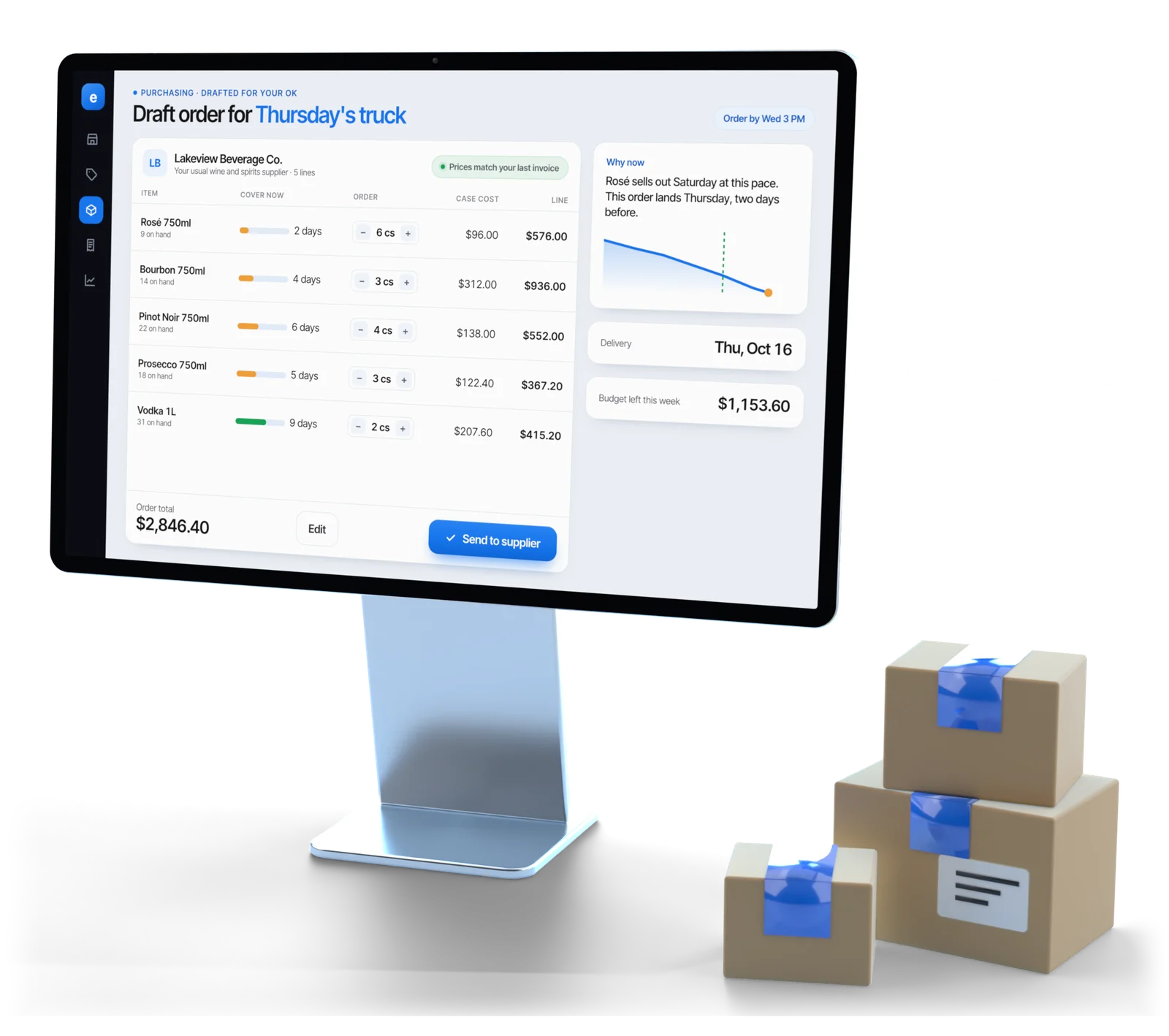
Illustrative example
The supplier rules
Every rule your supplier has, applied first
A purchase order is the document you send a supplier: each item, the quantity in the units they ship, the agreed cost and the delivery date. Most automated purchasing software stops at “you’re low on this.” The hard half is an order the supplier will accept.
| Supplier rule | What it means | What goes wrong if it’s ignored |
|---|---|---|
| Lead time | Days from sending the order to goods on the shelf | You order on the day you notice, which is already too late |
| Case pack | The unit the supplier ships: 6, 12 or 24 to a case | Someone else rounds the order, usually upward |
| Minimum order value | The dollar floor below which they won’t deliver | A rejected order, or a delivery fee you didn’t budget for |
| Minimum line quantity | The smallest quantity of one item they will pick | Lines quietly dropped from the delivery |
| Delivery days | The days they actually come to your street | An order sent Thursday that lands the following Wednesday |
| Order cut-off | The time of day after which you’re on the next run | A full day of lead time lost for the sake of an hour |
| Allocation | A cap on how much of a scarce item you may buy. In a liquor store, distributors can set one without warning; see our liquor store software. | You plan for twelve and receive four |
When a supplier’s real lead time drifts from the one agreed, say three days promised and five taken for a month, Esplanda plans to what actually happens. Holiday buys are counted back from each date on your retail marketing calendar.
How it works
How a purchase order gets written, step by step
These seven steps run every week before a draft reaches you. Keep the register you have, or use ours: on Esplanda POS the order comes straight from its sales and stock, with no matching queue. See the POS system with inventory management and our POS integrations.
Work out the need
How much of each item will sell before the next possible delivery, from Esplanda’s demand forecasting software, which also warns in days of cover before an item runs out.
Subtract what you have
Stock on hand, kept true by retail inventory management software that also flags dead stock by the cash tied up, plus anything already on order, so an open order is never placed twice.
Apply the supplier’s rules
Lead time, case pack, minimum order value, minimum line quantity, delivery days, cut-off and any allocation.
Round to a real quantity
Whole cases, rounded the way that costs you less.
Group by supplier
Every line for one supplier becomes one order, timed to its next delivery day.
Check your limits
Maximum per order, weekly ceiling and approved suppliers, tested before you see the draft.
Send it, or hand it to you
You approve it in one tap, or let Esplanda send any order that sits inside the limits you set once. Outside them, it always waits for you.
Grouping
One order beats four small ones
Four small orders to the same supplier in a week usually cost more than one. Independents place split orders all the time, one empty shelf at a time.
One supplier, a $500 minimum order and a $45 delivery fee below it
Illustrative example
- Held when it’s safe. Lines wait for the supplier’s next delivery day when holding them is safe, and go sooner when an item would run out in the meantime.
- Told when you’re short. When an order still lands under the minimum, Esplanda says how far under and which items you’ll need within two weeks anyway, instead of sending it quietly.
Your limits
Who writes the order, and who sends it
Who presses send is a setting, and it is yours. An order above your limit never goes out without you.
| Setting | What Esplanda does | Your part |
|---|---|---|
| Drafts on demand | Tells you what to reorder and when; drafts a purchase order on demand | You send it |
| Approve every order | Writes the purchase order continuously, timed to each supplier’s delivery day | One tap sends it, every order, every time |
| Send inside my limits | Sends the purchase order inside your maximum order value, weekly ceiling and approved suppliers | Set limits once, then approve anything outside them |
Start tight
Set a limit low enough that the first weeks are mostly approvals, then raise it once you agree with the drafts.
Approve, edit or say no
Change a quantity or cost, remove a line or add one. Cut the same item back three weeks running, and the fourth draft proposes less.
Every order on the record
Who created it, every edit with a name and time, who approved it, when it went and what arrived.
Then check the delivery
Match what arrived against the order with invoice scanning software.
Read why Esplanda is safe to trust, or see Esplanda pricing.
Order tracking
Purchase order management, from draft to delivery
Purchase order tracking doesn’t stop when the order is sent. Esplanda follows each one until what arrived matches what you were charged.
An order is not an invoice
The purchase order is what you asked for, sent before the delivery. The invoice is what the supplier says you owe, and it arrives with the goods. Holding both is how you dispute a bill.
Every open order in view
Each order shows whether it’s waiting for you, sent, part received or complete. Lines still on order count toward stock, so the same need is never ordered twice.
Sent the way each supplier orders
Orders go by email to the supplier’s ordering address. A supplier who takes orders by portal or by phone gets a ready-to-place task instead, every line filled in.
A three-way match at the back door
Each delivered line is checked three ways: the order, the invoice and the count. Short, extra, substituted and repriced lines come back with their dollar impact in invoice scanning software.
Suppliers measured, not guessed
Order and delivery times become each supplier’s lead time, fill rate and promise-kept rate, compared with your region in our supplier scorecard software.
A cost you can defend
An approved order and a matched delivery are the two halves of every cost, ready for a supplier rep or your bookkeeper.
Questions
Purchase order questions owners ask
What is purchase order software?
Purchase order software creates the orders you send suppliers: each item, the quantity in the units they ship, the agreed cost, the delivery date and where it's going. Esplanda goes further and drafts them from real sales, applying each supplier's case packs, minimums, lead times and delivery days before you see the order.
How does purchase order automation decide what to order?
It starts from how much of each item will sell before the next possible delivery, subtracts the stock you have and anything already on order, then turns that need into something the supplier can ship. That last step is most of the work: case packs, minimum line quantities, minimum order values and delivery days all change the answer.
Will Esplanda send purchase orders without asking me?
Only if you switch that on, and only inside limits you set once: a maximum value per order, a weekly ceiling and a list of approved suppliers. Anything outside those limits always comes to you as an approval request. Leave automatic sending off and every purchase order waits for one tap, whatever its size.
Can I edit a purchase order before it goes?
Yes. Change a quantity or cost, remove a line, or add one Esplanda didn't suggest. Every edit is recorded, and repeated edits in the same direction shape future drafts, so cutting the same item back three weeks running changes what the fourth draft proposes.
How does it handle case packs and minimum order values?
Needs are rounded to whole cases the way that costs you less: up for fast sellers with a long shelf life, down for slow or perishable items. Lines for one supplier are grouped into one order, and if it still falls short of the minimum, Esplanda tells you how far short so you can add or wait.
What is the difference between a purchase order and an invoice?
A purchase order is what you send the supplier before the delivery: each item, the quantity in the units they ship, the agreed cost and the date. An invoice is the supplier's bill for what they say they delivered. Esplanda checks one against the other, line by line, when the delivery arrives, which is how short deliveries and price rises get caught.
What happens if a supplier short-ships my order?
The order stays open for the missing quantity instead of closing quietly, so the need stays visible. When the delivery is checked against the purchase order, the difference is flagged as a short delivery, which is where money leaks if nobody checks.
How much does purchase order software cost with Esplanda?
Nothing. Purchase orders are part of the free Esplanda POS, with every setting available: drafts on demand, one-tap approval of every order, or sending inside your limits. No monthly fee, no setup fee, no contract. Keep Square, Clover, Lightspeed or KORONA if you prefer; they connect with no change at the counter.
Stop writing orders from memory
Start free today, or book a demo and we’ll draft a first order for a store like yours.
Esplanda POS and your website are free to start, with no card needed. Add paid tools only when you want them. Before you order, see what comparable stores near you charge with the free price check.
