
Liquor & wine stores

Liquor store software that writes your distributor orders

A free POS that scans IDs, adds deposits and breaks cases, even offline, plus reordering and nearby prices in one system.

Esplanda POS and your website are free to start, with no card needed. Add paid tools only when you want them. Not ready to start? Get your free price check.

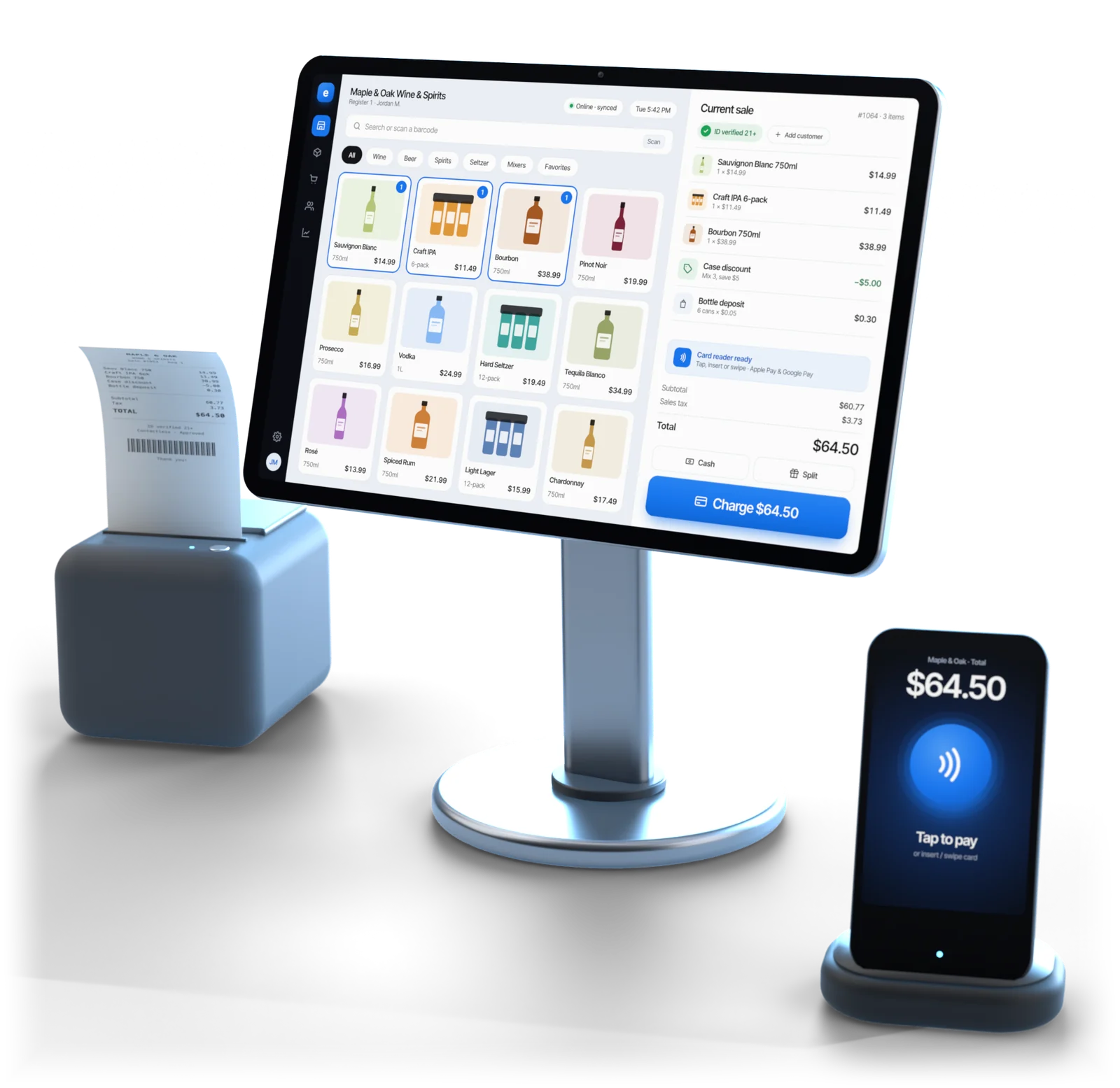
Esplanda POS register on a stand ringing a liquor store sale, with a receipt printer and a tap-to-pay card reader

Illustrative example

At the counter

What liquor store software has to get right

A general register leaves these jobs to the clerk. Esplanda's liquor store point of sale does them at the counter, so a busy clerk doesn't have to.

Describes any register without these jobs built in, not one brand.
At the counterWithout it built inEsplanda POS
Container depositA manual line, or lost inside the shelf priceCharged and refunded by container type
Single bottle from an open caseA second item for singles that drifts from the case countOne item; stock drops by one bottle
Mixed six-pack at the case priceThe clerk works out the discount by handMix-and-match applied and recorded
Age checkA yes/no prompt the clerk tapsDate of birth and expiry read from the license
Wine in four sizesFour unrelated productsOne product with its sizes and packs
Internet out on a FridayIf the register needs the internet, sales wait for itKeeps selling offline and syncs later
Reorder pointWorked out elsewhere from an exported fileWorked out on the count the sale just changed

The reorder-point row is the one owners underestimate: when the register and the ordering read one catalog, a broken case is a number, not a reconciliation.

Behind the counter

The rest of the liquor store, in the same system

As liquor store management software, Esplanda feeds every sale into the ordering, the prices, the customer list and your online store. You approve what matters, and each order, price move and win-back is saved with what it was expected to earn and what it did.

Ordering

Esplanda reads what sold and what's on the shelf, and does the ordering math every week.

  • Distributor orders, drafted from what sold and timed to each distributor's delivery day, with lead times and minimums applied. Approve each in one tap, or let Esplanda send any order inside the value cap and approved-supplier list you set once.
  • Run-out warnings early enough to act, and holiday buys for Thanksgiving, New Year's Eve and game days drafted weeks out from a retail marketing calendar.
  • Dead stock: cases that haven't moved in 90 days, the cash tied up in them, and a clearance price while they still sell.

See our purchase order software and inventory management for small business.

Prices nearby

Public shelf prices at liquor stores near you show where you're high on the bottles people shop around for, where you could hold more margin, and the labels and sizes they carry that you don't.

  • Cost increases caught from the invoice, with a new shelf price and its effect on profit, staged for one tap or moved inside your margin floor and price rules if you allow it.
  • Your floors kept: never below legal minimum prices for alcohol or the margin floor you set.
  • A price move near your floor always waits for your OK, and so does any move larger than your maximum move size.

Daily tracking of nearby shelf prices is the Competitor Intelligence add-on, $299 a month. Esplanda works from public shelf prices only, and every price you set stays your own decision.

The free price check shows what comparable wine and spirits retailers near you charge. More on competitor price tracking.

Regulars and getting found

Your best customer came in every ten days and hasn't been back in thirty. Esplanda notices.

  • Win-back offers inside your discount ceiling, sent when you approve them, and whether each one worked.
  • Loyalty and release-day alerts from one customer list, built from register sales.
  • Found nearby: your Google hours and listings kept right, holidays included.
  • Reviews answered in your voice, and replies to 1–2 star reviews always wait for you.

Loyalty is free in Esplanda POS. Win-back offers and listings are part of Marketing — Do It Yourself, $199 a month per location; Grow My Business ($699) contains it, so the two are never billed together. Review replies are Reviews & Reputation, $79 a month.

See our customer loyalty software and local SEO software.

License and compliance

Alcohol rules differ by state and often by town. Esplanda keeps the records and keeps the rules in view.

  • Every age check on record, saved with the sale it belongs to.
  • State differences flagged where delivery and marketing rules vary.
  • License renewal reminders well before the date, with your records kept in order.

Online ordering

Your website sells from the same catalog and the same stock as the counter.

  • Your own online store for pickup and delivery, with free hosting.
  • 99¢ per online order, never more than $299 in a month.
  • No percentage of your sales: Esplanda takes no cut of what you sell online.

See our POS with online ordering.

Invoices and shrink

The distributor's invoice and the shelf count are both checked against what the system expects.

  • Invoices by photo: snap the sheet the driver hands you, and Esplanda matches it to the order and flags what didn't arrive or arrived at a different cost, free in Esplanda POS.
  • Shrink in dollars: the stock the system expects against what a count finds, per item and per category, after every count.
  • A daily and a weekly report that take minutes to read.

See our invoice scanning software.

Also in the same system

  • Ask it in plain English. "Why was Thursday down?" gets an answer with the numbers behind it, free in Esplanda POS.
  • Named by AI assistants. Your store's facts kept the same everywhere, so ChatGPT, Perplexity and Gemini can quote them, with a report on whether they name you.
  • The phone answered. The AI receptionist takes the calls you can't get to in the after-work rush: AI Phone, $149 a month with 500 answered minutes, then 20¢ a minute, capped at 1,000 minutes until you approve a top-up.
  • Books & Expenses, $99 a month: profit and loss and cash flow kept current from the same sales.
  • Employee Scheduling & Attendance, $49 a month: the schedule written and clean hours handed to the payroll provider you already use.
  • Marketing — Do It Yourself: email, texts, social posts and ads, with ad spend on your own card, never marked up.

Your register

Switching your liquor store POS, or keeping yours

Keep yours

Keep the register you have

Already on Square, Clover, Lightspeed or KORONA? Esplanda connects to it, and Esplanda POS stays free for the day you switch.

Start where you are. A register change touches ID habits, state reporting and staff routines at once, so our POS integrations let you start on the register your staff already know.

Or use ours

Switch to Esplanda POS

Free, and the simpler path: the sale and the stock count come from one place, so there's nothing to match or reconcile at night.

Every counter job in detail: the liquor store POS system.

Card processing is optional. Keep your processor, with every software price the same on it, or take cards through Esplanda, a reseller for First American Payment Systems (a Deluxe company), from 2.79% + $0.10 in person and 2.89% + $0.30 online. Your rate is set when First American approves your account. More on credit card processing for small business.

Switching in six steps

The install takes an afternoon; the catalog is the real work. For a single store, plan on about a week. Moving from Heartland, LiquorPOS, Spirits 2000 or an online store on City Hive or BottleCapps? Export the item list to a spreadsheet and it comes across the same way. Exactly what moves across is set out before you sign: see switching without retyping the catalog. Compare City Hive alternatives and BottleCapps alternatives.

  1. Export your catalog

    Square, Clover, Lightspeed and KORONA exports, or a spreadsheet from any other register.

  2. Rebuild sizes and packs

    750ml, 1.75L, 12-packs, cases of 24. Case breaks and deals stand on them.

  3. Set deposits by container

    So the register charges and refunds them, not a clerk's memory.

  4. Spot-check with a scanner

    Every aisle, especially wine sizes, singles from packs and deposit items.

  5. Run both side by side

    Compare daily totals while both run, free for up to 30 days. A gap is almost always a catalog fix.

  6. Go live

    Take the old register off the counter. Groups convert one store first as the template.

Built for

Who Esplanda is built for, and what it works with

Built for liquor and wine stores

  • Independent liquor and wine stores, one location or a few. Running several? See every store in one view with multi-location inventory management.
  • Owners who want ordering and pricing done, with the final say.
  • Stores selling at the counter, online for pickup, or both, from one catalog.
  • Stores that sell more than liquor. A corner store with a beer cooler runs on our convenience store POS system, and a bottle shop with a kitchen on our restaurant management software, all on the same Esplanda POS.

Works with what you have

  • Your register: keep Square, Clover, Lightspeed or KORONA connected to Esplanda, with Esplanda POS free whenever you switch.
  • Your processor: every software price is the same on the processor you have.
  • Your gear: use the counter hardware you already own.
  • Esplanda POS$0
  • Your website$0
  • Per online order99¢
  • Most in a month$299

Migration and 30 days of parallel running come free with Esplanda POS · Email and chat support free · Paid tools priced one by one, per location per month · No setup fee, no contract, no per-user fees · No card needed to start

Questions

Liquor store software questions owners ask

What is the best software for a liquor store?

The best liquor store software handles ID scans, bottle deposits, case breaks and mix-and-match deals at the counter, and keeps selling when the internet drops. Esplanda POS does all five, runs on desktop, iOS and Android, and is free.

How does liquor store software handle age verification?

Esplanda POS reads the barcode on a driver's license or ID, checks the date of birth and expiry, and saves the check with the sale, so every age check is on record. It is a real check, not a yes/no prompt a busy clerk taps through.

Can a regular retail POS system be used for a liquor store?

A general register rings the sale but leaves the liquor jobs to the clerk: deposits keyed by hand, a second item for singles that drifts from the case count, mix-and-match worked out at the counter and an age prompt someone taps. Esplanda POS does those jobs itself at the counter, and it is free.

Does Esplanda handle liquor license and alcohol compliance?

Esplanda keeps the records and the reminders. It records every age check with the sale, never suggests a price below legal minimums for alcohol, sends license renewal reminders and flags where delivery and marketing rules differ by state. Rules are set by your state and license, and Esplanda keeps them in view.

How does Esplanda handle bottle deposits, case breaks and mix-and-match deals?

Deposits are set per container type for your location, charged at the sale and refunded on returns. One item sells as a single bottle or a full case with stock kept right, and mix-and-match rules, such as any six wines at the case price, apply automatically and are recorded.

Will ID scans, deposits and case prices still work at my liquor counter if the internet goes down?

Yes. The ID scan, container deposits, case and single-bottle prices and mix-and-match wine deals all run on the machine at the counter, so a Friday rush keeps moving and each sale syncs when the connection returns. Card payments follow the card terminal's offline rules.

How much does liquor store software cost?

Esplanda POS is free, with the migration and 30 days of parallel running, and runs on the counter computer, tablet or phone you already have. Your website is free too: free hosting, then 99¢ per online order, never more than $299 in a month. You add only the paid tools you want, each priced on its own per location per month, with no setup fee, no contract and no per-user fees, and every software price is the same on the processor you already have. Card processing is optional: Esplanda resells First American Payment Systems, a Deluxe company, from 2.79% + $0.10 in person and 2.89% + $0.30 online, with your rate set when First American approves your account. Every current price is on the Esplanda pricing page.

Do I have to replace my current liquor store POS?

No. Keep Square, Clover, Lightspeed or KORONA connected to Esplanda, or switch to Esplanda POS, which is free, with no products to match between two systems. To switch, export your item list (Heartland, LiquorPOS, Spirits 2000, City Hive and BottleCapps lists come across as a spreadsheet), set sizes, packs and deposits, spot-check with a scanner and run both registers side by side, free for up to 30 days; for one store, plan on about a week to switch.

Run your liquor store on one system

Start free today, or book a demo and we'll walk through Esplanda on a store like yours. Not ready to start? Get your free price check to see what comparable liquor stores near you charge.

Esplanda POS and your website are free to start, with no card needed. Add paid tools only when you want them.

Powered by
esplanda