
Restaurants & bars · counter service

Restaurant management software that tracks your food cost

Food cost from invoices, supplier orders, online ordering and reviews for counter-service restaurants, cafés and bars, with a free POS.

Esplanda POS and your website are free to start, with no card needed. Add paid tools only when you want them. Not ready to start? Get your free price check. See how Esplanda works.

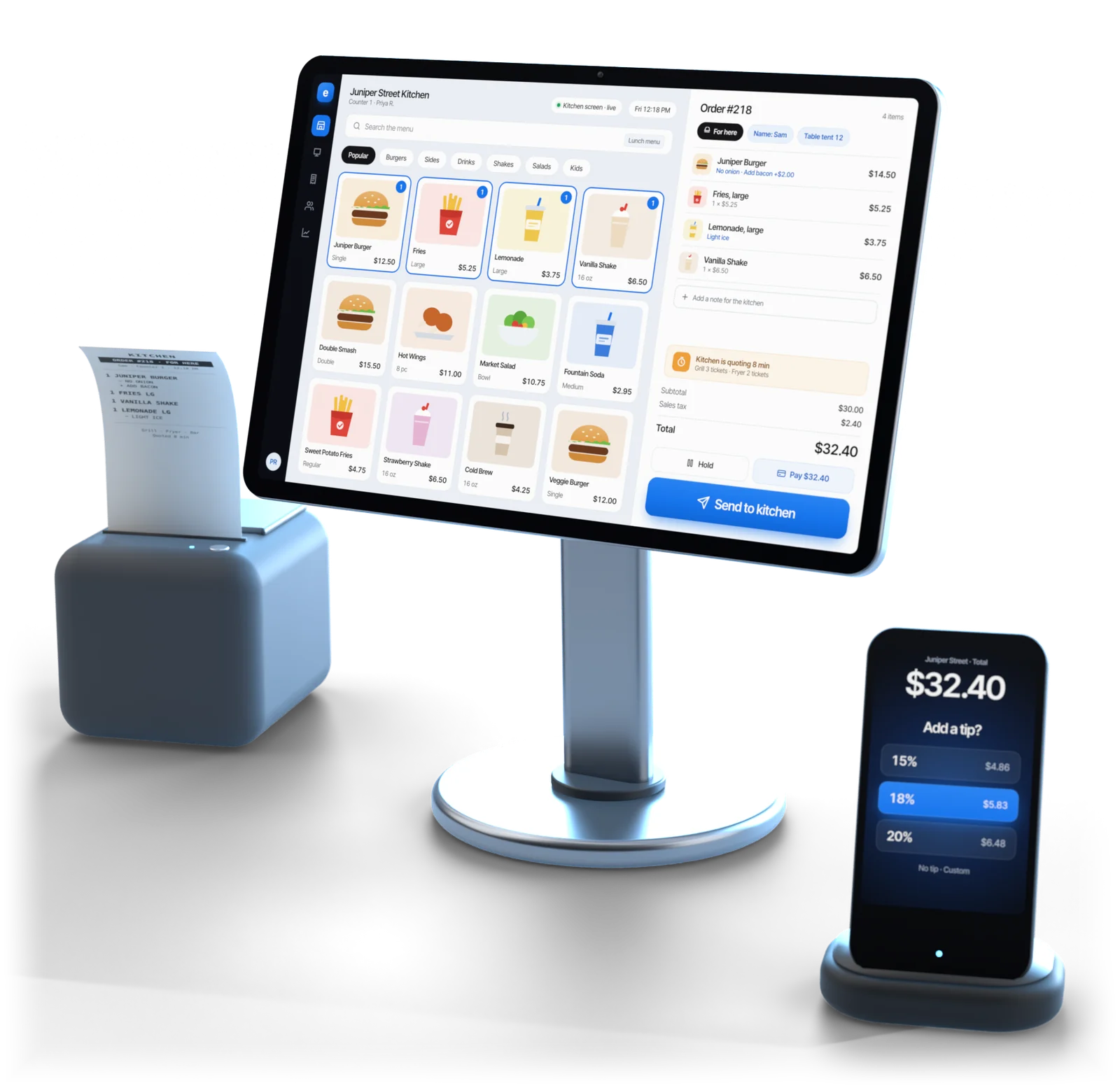
Esplanda POS register showing a counter-service menu and an order ready to send to the kitchen, with a receipt printer and a card reader asking for a tip

Illustrative example

Built for

Which restaurants Esplanda POS is built for

Esplanda POS is built for the counter, where a ticket fires the moment the order is complete. A dining room that times courses between kitchen and floor keeps its restaurant register on the floor.

Keeping your restaurant register? Esplanda's back office connects to it if it's Square, Clover, Lightspeed or KORONA, and Esplanda's own restaurant POS system is free either way.
Your restaurantYour registerWhy
Quick service and fast casualEsplanda POSOrders fire on completion; counter speed is what matters
Café and coffee shopEsplanda POSSmall menu, lots of modifiers, a fast line
Bar and cocktail barEsplanda POSTabs, ID scans and fast repeat rounds
Taproom and breweryEsplanda POSPours plus to-go cans and crowlers with deposits, one catalog
Bottle shop with a kitchenEsplanda POSRetail and food together, with case breaks and age checks, as in our liquor store POS system
Ghost kitchen, delivery onlyEsplanda POSOrders come through the delivery apps, with little or no counter
Casual full service with table turnsYour restaurant registerTable management and server workflow stay on the register your floor already runs
Fine dining, multi-courseYour restaurant registerCoursing and the kitchen display stay on the register built for them
Banquet or multi-roomYour restaurant registerFloor coordination and tip pooling stay where your staff run them today

Food cost

From supplier invoice to menu price

The best-selling dish is often not the most profitable. Esplanda works out the margin on every dish from what you paid this week, whether it rings the sale or reads it from your register.

  1. Photograph the invoice

    Snap the delivery sheet. Esplanda reads it and matches it to what you ordered, free in Esplanda POS. More on invoice scanning software.

  2. Catch the change

    A case that went up without a call, or three billed and two delivered.

  3. Update dish costs

    Every dish that uses the ingredient gets its new cost, at the price you actually paid.

  4. Rank what moved

    Dishes ranked by how much margin moved, with the ones that crossed a margin line first.

  5. Decide

    Reprice, re-spec or leave it, with the dollar effect estimated and the result recorded afterward: see how we measure results.

Then the whole menu, sorted by margin and sales

How Esplanda sorts a menu by margin and sales, and what it suggests for each group.
GroupWhat it isWhat Esplanda suggests
ProtectHigh margin, high salesLeave it alone and watch its ingredient costs weekly; cost creep hurts most here.
PromoteHigh margin, low salesA better menu position, a server callout or a campaign.
Reprice or re-specLow margin, high salesA small price move, a portion change or a different supplier.
CutLow margin, low salesTake it off; it costs prep time, stock, waste and menu space.

Before a menu price moves, the free price check shows what comparable restaurants near you charge for 5 menu items you all serve, each with its source and the date it was seen, with no sign-up.

Inventory

Restaurant inventory software that orders from real usage

Esplanda is restaurant inventory management software built on what you actually go through, so the order is right before each supplier's cut-off and every delivery is checked against it.

  • Forecast from real usage

    Esplanda forecasts what you'll go through from what you sold, free in Esplanda POS, so the order starts from real usage instead of a par level.

  • Orders built around cut-offs

    Each supplier's cut-off time and minimum applied. You approve the order in one tap, or let it go out inside the value cap and approved-supplier list you set once.

  • Every delivery checked

    Photograph the invoice and Esplanda flags short deliveries you paid for and prices that went up without a call.

  • 86 it once

    Take an item off and it goes dark on your website, and on DoorDash and Uber Eats with Marketplace Connectivity, at the same time.

Online and guests

Orders from outside, and the guests

Online orders and delivery apps

  • Your own online ordering: website orders from the same menu, with free hosting, then 99¢ per online order, never more than $299 in a month. Esplanda takes no percentage of those sales.
  • DoorDash and Uber Eats menus and hours kept from one place, so an item you take off goes dark everywhere at once; prices for each app are proposed and you approve them. That is Marketplace Connectivity, $69 a month per location, for restaurants doing $2,000 a month or more on the apps; places that sell alcohol are offered it after legal review.
  • Margin per app after commission, so you see which one earns its slot.

More on our online ordering system for pickup and delivery.

Reviews, the phone, the schedule and the books

  • Review replies in your voice: drafted for your approval, or sent for 3, 4 and 5 star reviews inside your tone rules, with Reviews & Reputation ($79 a month). See our review management software.
  • Replies to 1–2 star reviews always wait for you. Read why Esplanda is safe to trust.
  • The phone during service: hours, directions, wait times, availability and order status answered, and it tells callers it's your restaurant's AI receptionist. AI Phone is an add-on at $149 per location per month with 500 answered minutes, then 20¢ a minute, and the line stops at 1,000 minutes until you approve a top-up. Web chat, owner inbox triage and the staff answer device are the AI Chat & Order Helper, an AI chatbot for small business at $29 a month, with the first 90 days free. More on the AI receptionist.
  • Shifts planned against the week's forecast and priced before you post them, with clean hours for the payroll provider you already use, in Employee Scheduling & Attendance ($49 a month). See our staff scheduling software.
  • Profit and loss kept current: expenses, cash flow and the P&L from the same sales and invoices, with Books & Expenses ($99 a month), ready for your bookkeeper.

Guests and marketing

Esplanda's restaurant marketing software notices when a regular stops coming, and keeps you easy to find.

  • Regulars who drift past their usual visits get a win-back inside your discount ceiling, sent by email or text when you approve it, inside your contact limits.
  • Loyalty points from one guest list built from register sales, redeemed at the counter, free in Esplanda POS.
  • Hours and menu kept right on Google and your listings, plus email, texts, social posts and ads, with ad spend on your own card, never marked up. Win-backs, listings, posts and ads are part of Marketing — Do It Yourself, $199 a month per location; Grow My Business ($699) contains it, so the two are never billed together.

See our marketing automation for small business.

Free

The restaurant and cafe POS system for counter service

  • Modifiers ring on the line and print on the ticket.
  • Tickets by station to a kitchen printer, or to a kitchen display you already run.
  • Tabs on a card hold, tips at close, happy-hour prices by the clock.
  • ID scans at the bar, saved with the sale.
  • Keeps ringing offline, then syncs when the connection returns.
  • Counter, bar and patio: desktop, iOS and Android, one menu.
  • Keep yours. Esplanda connects to Square, Clover, Lightspeed or KORONA, and Esplanda POS stays free for the day you switch. See our POS integrations.
  • Or use ours. Orders and stock come from one place, so there's nothing to reconcile at night. See the full POS system with inventory management.
  • Card processing is optional, and every software price is the same on the processor you have. Esplanda resells First American Payment Systems (a Deluxe company) from 2.79% + $0.10 in person and 2.89% + $0.30 online. Your rate is set when First American approves your account; under a $20 average check, compare on the per-transaction fee.

Price

Built for counter service, and what it costs

Built for counter service

  • Printed at the grill. Tickets by station to a kitchen printer, or to the kitchen display you already run.
  • Modifiers on the ticket. Every change rings on the line and prints at the station.
  • Food cost from supplier invoice to menu price, free in Esplanda POS.
  • One location or several. A group view compares sites, recommends stock moves between them and rolls one decision out everywhere: see multi-location inventory management.
  • Esplanda POS$0
  • Your website$0
  • Per online order99¢
  • Most in a month$299

Migration and 30 days of parallel running come free with Esplanda POS, which runs on the computer, tablet or phone you already have · Email and chat support free · Paid tools priced one by one, per location per month · No setup fee, no contract, no per-user fees · No card needed to start

Questions

Restaurant software questions owners ask

What is restaurant management software?

Restaurant management software handles the work around the food: food cost against menu price, supplier orders, invoices, online ordering and delivery apps, reviews, guest win-backs, the schedule and the numbers. Esplanda does that for counter-service restaurants, cafes and bars, and includes a free counter-service POS.

Can Esplanda replace Toast or another full-service restaurant register?

For counter service, cafes, bars and taprooms, where an order fires when it's complete, yes: Esplanda POS can replace it, and it is free. A full-service room runs coursing, table management and a kitchen display on Toast or another full-service register, the tools those registers are built for, so that register stays on the floor. Esplanda's register connection covers Square, Clover, Lightspeed and KORONA. See Esplanda vs Toast.

How does Esplanda calculate food cost?

From your supplier invoices, free in Esplanda POS. Photograph the delivery sheet and Esplanda reads it, then applies the price you actually paid to every dish that uses that ingredient. When a cost moves, the dishes that crossed a margin line are flagged with a suggested price.

How does restaurant inventory management software work?

It forecasts what you'll go through from what you sold, builds each supplier order around the cut-off and minimum, and checks every delivery against the order from a photo of the invoice. Esplanda does the forecast and the invoice check free in Esplanda POS. You approve each order in one tap, or let it go out inside the value cap and approved-supplier list you set.

Can Esplanda run online ordering and the delivery apps?

Yes. Your own website takes pickup and delivery orders from the same menu as the counter, with free hosting, then 99¢ per online order, never more than $299 in a month, and Esplanda takes no percentage of those sales. Marketplace Connectivity, $69 a month per location, keeps your DoorDash and Uber Eats menus and hours from one place, shows each app's margin after commission and proposes prices for each app for your approval. It is for restaurants doing $2,000 a month or more on the apps; places that sell alcohol are offered it after legal review.

Can the register handle tabs and tips at a bar?

Yes. A tab opens on a card hold, rounds are added through the night, and it closes with the tip; tips written on the receipt can be adjusted before the batch closes.

Who answers the phone during service?

Esplanda's AI receptionist does, for the calls that are hours, directions, wait times, whether you take reservations, whether an item is available and where an order is. It tells callers it's your restaurant's AI receptionist and hands anything else to a person. AI Phone is an add-on at $149 per location per month with 500 answered minutes, then 20¢ a minute, and the line stops at 1,000 minutes until you approve a top-up. Web chat, owner inbox triage and the staff answer device are the AI Chat and Order Helper, $29 a month, with the first 90 days free.

How much does restaurant management software cost?

For counter-service restaurants, cafes and bars, Esplanda POS is free, with the migration and 30 days of parallel running, and runs on the computer, tablet or phone you already have. Your website is free too: free hosting, then 99¢ per online order, never more than $299 in a month. A full-service room keeps its restaurant register and, if it's Square, Clover, Lightspeed or KORONA, connects it to Esplanda. If you want new gear, tested POS hardware is a one-time purchase. You add only the paid tools you want, each priced on its own per location per month, with no setup fee, no contract and no per-user fees, and every software price is the same on the processor you already have. Card processing is optional: Esplanda resells First American Payment Systems, a Deluxe company, from 2.79% + $0.10 in person and 2.89% + $0.30 online, with your rate set when First American approves your account. Every current price is on the Esplanda pricing page.

Run your restaurant's back office on one system

Start free today, or book a demo and we'll walk through Esplanda on a restaurant like yours. Not ready to start? Get your free price check to see what comparable restaurants near you charge.

Esplanda POS and your website are free to start, with no card needed. Add paid tools only when you want them.

Powered by
esplanda